PermaplanT Technical Data Processing Documentation
1. Overview
PermaplanT processes personal and usage-related data to provide user authentication, collaborative map creation, seed collection management, and gamification features within the platform.
The application relies on multiple components:
- its own backend,
- a PostgreSQL database,
- Keycloak for identity management,
- and Nextcloud for file storage.
This document provides a technical overview of what data is collected, where it is stored, how it is processed, and which third-party systems are involved.
It focuses purely on technical data flows, not legal interpretation.
The contents serve as a foundation for drafting the official privacy policy and for supporting GDPR-related evaluations.
2. Server Logging
2.1 What is logged
We don't log IPs or other sensitive data.
We use actix_web Logger middleware for HTTP request logging.
The backend uses env_logger together with log as a logging framework.
env_logger allows to configure logging via the environment variable RUST_LOG.
2.2 Logging Configuration
The dev build uses debug level and only prints to stdout/stderr.
Logs are written to a file for the production environment.
Logs are also relayed via OpenTelemetry for SigNoz.
2.3 Log storage & retention
Running the app locally/in the devcontainer doesn't produce log files, but for production the logging stream is written to a file.
How long logs are stored in this file isn't specified. (indefinitely)
3. Cookies & Browser Storage
3.1 Cookies
We don't use tracking cookies.
We don't use cookies for authentication.
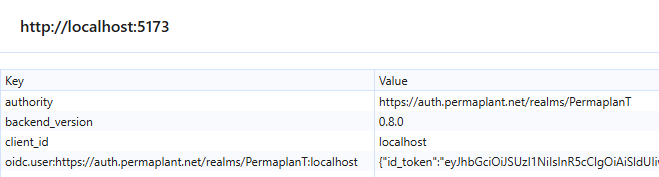
3.2 sessionStorage / localStorage
Session storage is only used for authentication tokens.
Example:
Local storage is only used for MapStore and basic layout settings.
Example:

4. User Data in Database
4.1 User Profile Fields
Guided Tours
| Column name | Data type | Example | Additional information |
|---|---|---|---|
| user | uuid | 00000000-0000-0000-0000-000000000000 | PRIMARY KEY |
| editor_tour_completed | boolean | false | has the user completed the Map Editor Tour |
For each user we only store if they completed the guided tour.
4.3 Map-Related Data
Users can create maps that are then linked to their user id in the database.
Maps can include custom layers, plants and drawings created by the user.
Maps can be set to be private, public or protected.
4.4 Seed Collection Data
Users can create their own seed collection in the seeds table.
Seeds include information like name, harvest year, origin and custom notes created by the user.
Seeds are linked to a user by user id.
4.5 Notes
Users can add personal notes to almost any object placed in a map, as well as to their saved seeds. Users might choose to include personal information in these notes.
4.6 Collaboration & Sharing
Maps that are set to public can be viewed by all other users.
Map owners can set other users as collaborators, allowing them to view and edit the map owners map.
5. Third-Party Services
5.1 Keycloak
For identity and access management we use self hosted Keycloak.
Info about Keycloak database?
Detailed information about the usage of Keycloak
5.2 Nextcloud
We use Nextcloud to store files uploaded by the user.
Detailed information about the usage of Nextcloud
6. Authentication & Session Management
We use OIDC with keycloak.
Maybe detailed authentication flow here?
Detailed information about authentication
6.1 Data flow
Nextcloud and Keycloak are both running as separate services.
Users are created in Keycloak with certain roles and permissions.
When a user wants to log in to PermaplanT they get redirected to Keycloak and after logging in using their credentials they get redirected back to PermaplanT with an access token.
The returned access token they get from Keycloak can be used to make requests to PermaplanT and Nextcloud, by setting Authorization: Bearer <returned_access_token> in the header.
The token is stored in the session storage and sent to the backend with every request.
Tokens are valid for 5 minutes.
Detailed information about token usage
7. Data Retention
User created content is marked with a deleted_at timestamp when a user chooses to delete it.
There is a cronjob in the backend that permanently deletes maps and layers that have been marked for deletion 60 days in the past.
If maps are still in the database, they can still be recovered.
7.1 User account data retention
We don't have a structured process for the deletion of users yet.
Probably we will simply remove them from the membership group in Keycloak.
7.2 Log retention
I don't think we have specified how long we retain logs for.
7.3 Nextcloud file retention
We use the default behaviour for file deletions in nextcloud.
Deleted files get moved to the trashbin.
Deleted files stay there until deleted either after 30 days (by default) or when space is needed.
In config.php admins can adjust when the trashbin is cleared.
Example: 'trashbin_retention_obligation' => 'auto, 30';
Where auto means auto-cleanup to avoid quota overflow,
and 30 specifies the maximum age in days.